|
3
Years of certification
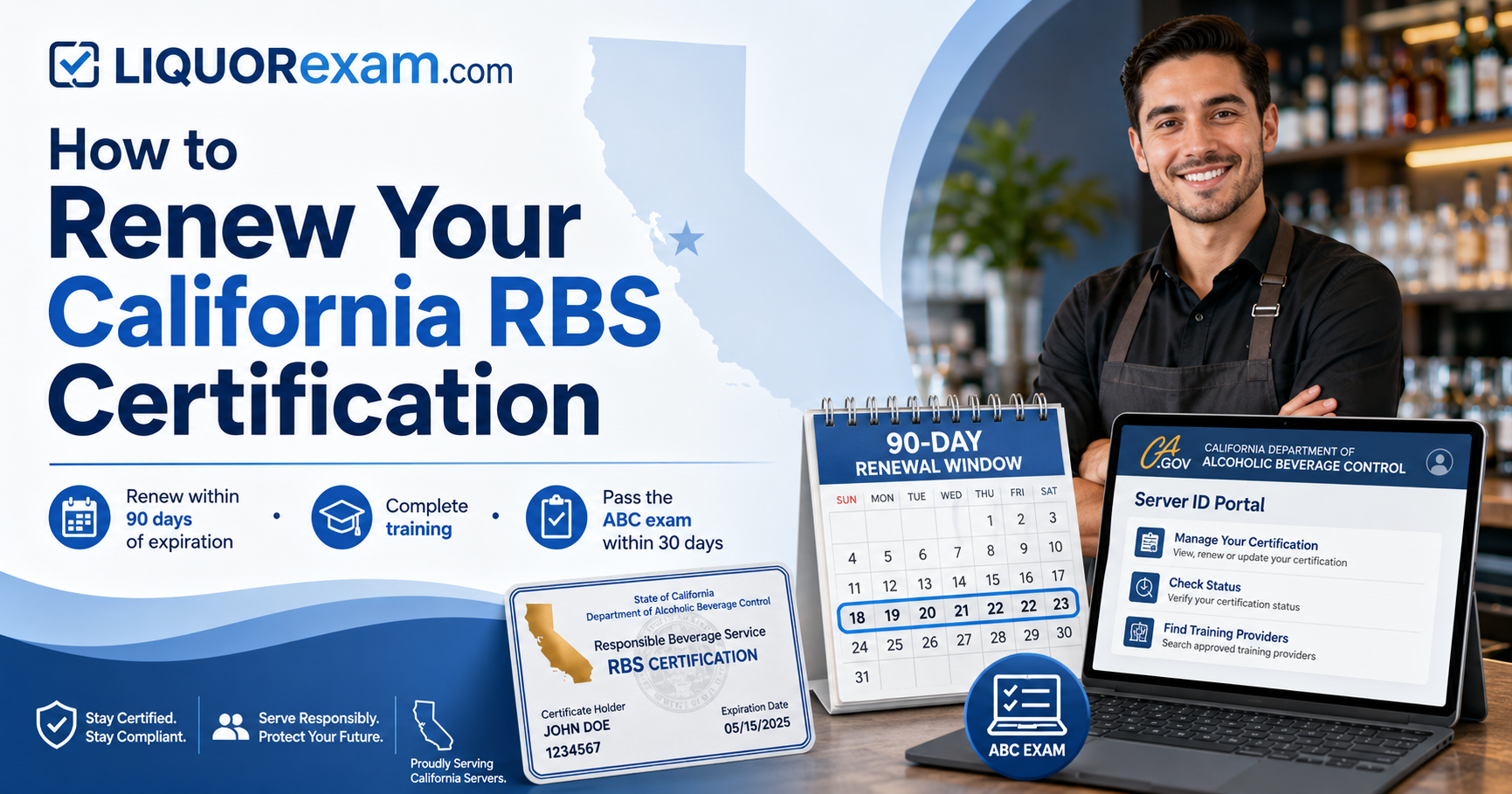
Your California RBS certification is valid for three years.
|
90
Days before expiration
You may begin renewing when you are within 90 days of expiration.
|
30
Days to pass the ABC exam
After completing approved training, complete the state exam within 30 days.
|
California alcohol servers and managers must maintain an active Responsible Beverage Service certification to remain compliant with the California Department of Alcoholic Beverage Control. Renewal requires more than simply extending the date on an existing certificate. You must return to the ABC RBS Portal, complete approved training again, and pass the ABC Alcohol Server Certification Exam.
The most important part of the renewal process is timing. California ABC allows you to begin renewing only when your current certification is within 90 days of expiration. Completing a new training course before that renewal window opens may leave you unable to access the ABC renewal exam.
You can begin the renewal process when you are within 90 days of the expiration date shown in your ABC RBS Portal account.
ABC may send reminder emails before expiration to the email address connected to your RBS Portal account. However, you should not rely only on an email reminder. Log in periodically and review the expiration date displayed in the Server Certificate Details section of your dashboard.
If your certification expires more than 90 days from today, wait until the renewal window opens. Training completed too early may not make the renewal exam available, and you may have to retake the training after you become eligible.
|
1
|
Log in to your existing ABC RBS accountVisit the California ABC RBS Portal and sign in using your existing account. Do not create a second account simply because you are renewing. Confirm that your full name, Server ID, email address, certification status, and expiration date are correct. |
|
2
|
Confirm that you are within 90 days of expirationReview the expiration date shown in the Server Certificate Details area. If the date is within the next 90 days, you may proceed with renewal. If the portal still shows that you are certified and does not offer the renewal process, you may not yet be within the permitted renewal window. |
|
3
|
Complete the ABC recertification processFollow the renewal instructions in your ABC account and pay the recertification fee displayed by ABC. The ABC fee is separate from the cost of training through an approved training provider. |
|
4
|
Retake approved California RBS trainingRenewal requires you to complete an approved RBS training course again. Enroll in LIQUORexam.com’s California Responsible Beverage Service Training and complete all required course content. Make sure the last name and nine-digit Server ID in your LIQUORexam.com profile match the information in your ABC RBS account. |
|
5
|
Complete and pass the LIQUORexam.com courseComplete the entire course and pass the LIQUORexam.com exam. When the results screen and course certificate appear, your completed training is reported to California ABC. A training-provider certificate confirms that you completed the course. It does not, by itself, renew your official ABC certification. |
|
6
|
Take the official ABC exam within 30 daysReturn to the ABC RBS Portal after your training has been confirmed. The Take Exam option should become available on your RBS Server dashboard. You must pass the ABC Alcohol Server Certification Exam within 30 days of completing the approved training. |
|
7
|
Verify your renewed certificationAfter passing the ABC exam, return to your dashboard and confirm that your status shows Certified and that a new expiration date appears. The ABC RBS Portal is the official source for your certification status. |
These short videos explain the most common steps students need help with, including obtaining a Server ID, updating the Server ID in a LIQUORexam.com profile, and accessing the official California ABC RBS exam.
Your existing certification may still be active, and you may not yet be within the 90-day renewal window. Check the expiration date displayed in the Server Certificate Details section of your ABC dashboard.
Training completed before you are eligible to renew may not provide access to the renewal exam. You may need to wait until you are within 90 days of expiration and then complete the training again.
First confirm that you completed the entire LIQUORexam.com course and passed the course exam. A lesson progress indicator showing 100% does not necessarily mean the final exam was completed.
Also confirm that your Server ID and last name match the ABC RBS Portal exactly. Review our California RBS Training Help Guide for troubleshooting steps.
Log in to both accounts and compare the information. Your last name and Server ID in LIQUORexam.com must match your ABC RBS profile.
For an issue inside the ABC Portal, contact California ABC at rbssupport@abc.ca.gov . For an issue with your LIQUORexam.com profile, email contact@LIQUORexam.com .
If you do not pass the ABC exam within 30 days after completing approved training, you may need to complete the training again before the exam becomes available.
In your LIQUORexam.com profile, go to My Courses and select Take This Training Again to reset and reenroll in the course.
No. The LIQUORexam.com certificate documents completion of the approved training. Your official RBS certification is established after you also pass the ABC Alcohol Server Certification Exam. Your official status appears in the ABC RBS Portal.
Resetting a course removes its current progress. If you are still eligible to resume an active course, log in and select Resume Training instead. Reset only when you need to begin the course again for renewal or because your ABC exam window has expired.
Complete ABC-approved California alcohol server training online and prepare for the official ABC certification exam.
View California RBS TrainingCombine required RBS training with practical bartender skills training in one package.
View the RBS and Bartender BundleBuild broader alcohol-service knowledge with a certificate program designed for bartenders and servers.
View the Certificate ProgramComplete alcohol-server and food-handler training through one convenient online bundle.
View the RBS and Food Handler BundleComplete online food-handler training for employees who prepare, store, or serve food.
View California Food Handler TrainingFirst confirm that you are within 90 days of your current certification’s expiration date. Then complete the ABC renewal steps and enroll in approved online training.
Enroll in California RBS TrainingThis information is provided as a general guide and is based on California ABC RBS requirements available at the time of publication. Rules, fees, portal procedures, and examination requirements may change. Always review the current instructions in your California ABC RBS Portal before beginning the renewal process.